Weekly Planning
Weekly planning is where the magic happens. It's the bridge between your big-picture goals and your daily actions—the moment when you decide what actually gets done this week versus what waits.
Without weekly planning, you're reacting. Each day starts with "what should I do?" which leads to doing whatever feels urgent or easy. With weekly planning, you start each day knowing exactly what matters. You've already made the hard choices about priorities.
Twenty minutes that change everything
A focused weekly planning session—just 20-30 minutes—pays dividends all week. You'll work on what matters instead of what's loudest. You'll feel in control instead of reactive.
The Weekly Planning View
Navigate to Tactical → Plan to see your week laid out.
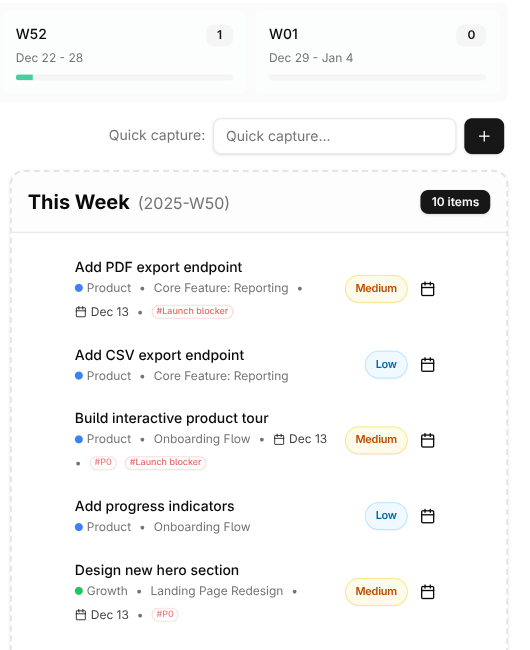
You'll see:
The week grid shows all seven days with any tasks already assigned. This is where you'll drag tasks to schedule them.
The week pool holds tasks you've committed to this week but haven't assigned to specific days. These are "I'll do this sometime this week" items.
Upcoming and inbox shows tasks waiting to be planned. Pull from here to populate your week.
The Weekly Planning Session
Set aside 20-30 minutes each week. Sunday evening or Monday morning works for most people—you want to plan before the week's chaos begins.
Review What Happened
Start by looking back. What did you actually do last week? Check your completed tasks and celebrate the wins. Notice what you committed to but didn't finish. No judgment—just notice. This informs what's realistic this week.
If tasks rolled over, make an active decision: do they go on this week's plan, or back to the backlog? Don't just carry over everything automatically. Some things that felt important last week might not matter anymore.
Check Your Bigger Picture
Before diving into tasks, zoom out. Glance at your OKRs and active projects. What needs attention this week to keep making progress?
This is how you ensure your week isn't just busy but actually meaningful. It's easy to fill days with small tasks while your important projects stagnate. Checking the bigger picture first prevents that.
Connect up and down
Good weekly planning bridges strategy and tactics. You should be able to trace most of your week's tasks back to projects, which connect to life areas and OKRs. If a task doesn't serve something bigger, question whether it deserves space in your week.
Build Your Week
Now, populate your week:
Start with the fixed commitments. What meetings, appointments, and obligations are already set? Block these out first. They constrain what's possible.
Add tasks that support your key results and projects. These are your most important items—make sure they have a place before the small stuff crowds them out.
Include some quick wins. A mix of challenging work and easy completions keeps you motivated.
Schedule habits. They'll appear automatically when due, but it helps to mentally account for the time they take.
Leave buffer. This is critical. Things always take longer than expected, and surprises always appear. If you schedule every minute, you're setting yourself up for frustration. A good rule: leave 20-30% of your time unscheduled.
Assign Days (or Don't)
You can either:
Assign specific days by dragging tasks to Monday, Tuesday, etc. This works well if you know your week's rhythm—deep work on Tuesday, meetings on Wednesday, admin on Friday.
Keep tasks in the week pool and pull them into each day as the week unfolds. This is more flexible but requires daily decisions.
Most people use a hybrid: schedule the important stuff on specific days and keep lighter tasks in the pool.
The overplanning trap
It's tempting to fill every day with ambitious plans. Resist. A week where you complete 80% of a realistic plan feels better than completing 40% of an overloaded one. Build trust with yourself by making promises you can keep.
The 3-3-3 Method
One approach to weekly planning: pick 3 big tasks, 3 medium tasks, and 3 small tasks for the week.
Big tasks are significant work—things that move projects forward meaningfully. Maybe 2-4 hours each. These are your priorities.
Medium tasks are important but less demanding. An hour or two. They support your goals without requiring deep focus.
Small tasks are quick wins. Under an hour each. They keep your system clean and give you momentum.
This framework prevents both extremes: weeks filled with trivial busywork and weeks where you've committed to nothing but marathons.
Weekly Themes
Some people assign themes to days:
- Monday — Planning and coordination. Start the week by getting organized.
- Tuesday/Wednesday — Deep work. Protect these for your most demanding projects.
- Thursday — Collaboration and meetings. Batch these together.
- Friday — Admin and review. Close loops and prepare for next week.
Themes reduce decision fatigue. When someone asks for a meeting, you don't have to think—"meetings are Thursday." When you're procrastinating deep work, you know "this is Tuesday, my deep work day."
This isn't for everyone. Some weeks are too unpredictable. But if your schedule allows, themes add helpful structure.
When Plans Change
Even the best plan meets reality. Priorities shift. Emergencies arise. Some tasks take three times longer than expected.
When this happens, don't abandon the plan—adjust it. Move tasks to later days or back to the week pool. Drop something if you need to. The plan is a tool, not a contract.
The weekly review (see Weekly Reviews) is where you'll process what happened and learn from it. But during the week, just make pragmatic adjustments and keep going.
Flexibility is a feature
A plan that can't flex is useless. The goal isn't to execute your original plan perfectly—it's to make intentional choices about what gets done. Adjusted plans still beat no plan at all.
Common Mistakes
Planning without reviewing. Don't just pile on new tasks. Look at what happened last week. Learn from it.
Ignoring your calendar. That Tuesday looks great for deep work until you remember you have four hours of meetings.
All big tasks, no small wins. You need some easy completions to stay motivated. A week of nothing but marathons is exhausting.
No buffer time. Life happens. Build in slack or you'll always be behind.
Planning the week on Wednesday. By then, half the week is over and you've been reactive for days. Plan at the start of the week.