Quick Start
Get up and running with LifeGrid in just a few minutes. This guide will walk you through the essential concepts and help you start planning your life with strategic clarity.
Time to complete
This guide takes about 5 minutes to read. You'll be ready to start planning right away!
The Three Layers
LifeGrid organizes your life into three interconnected layers. Think of it like a pyramid: your long-term strategy at the top guides your weekly tactics, which determine your daily actions.
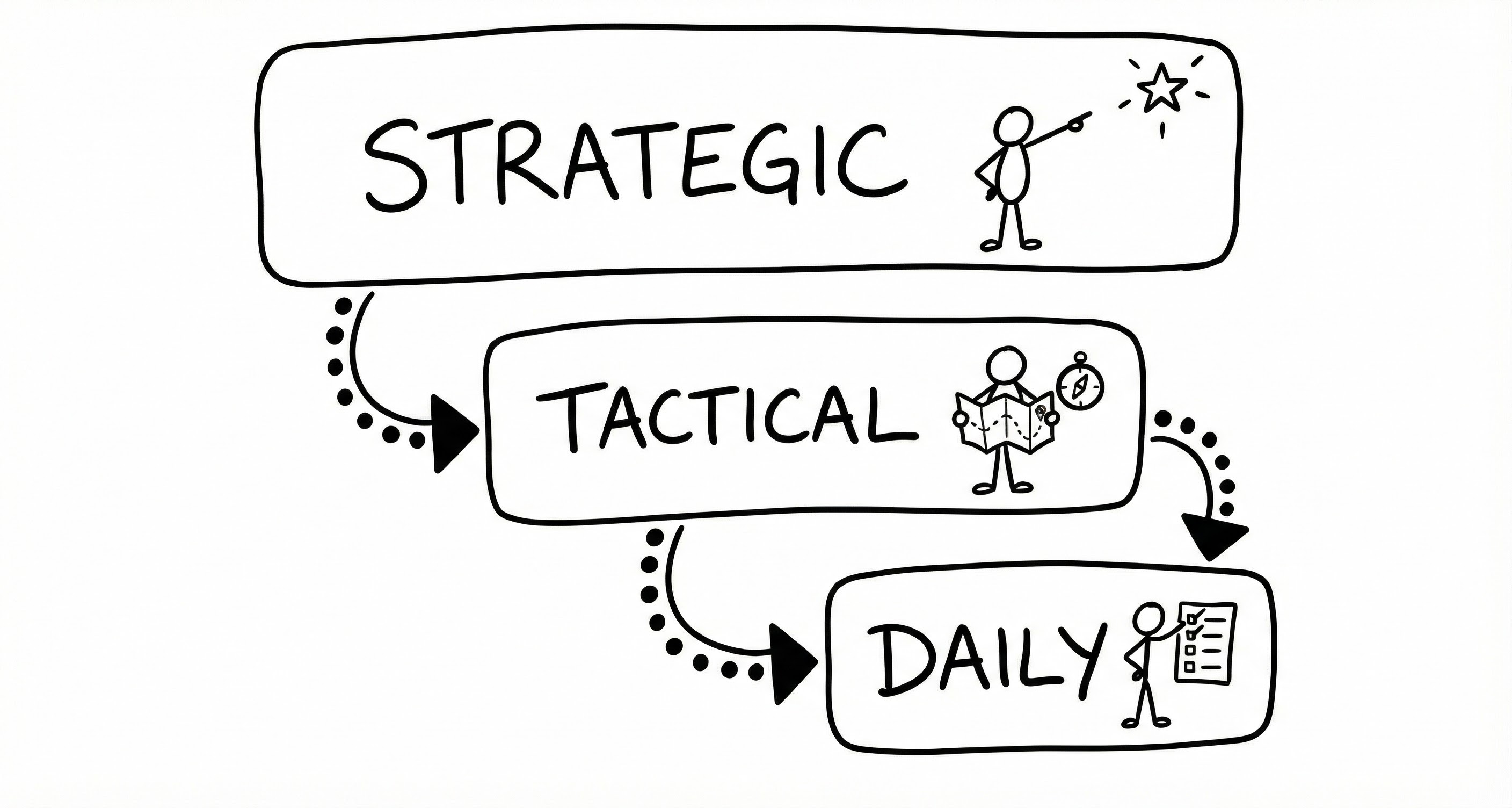
Strategic is your north star. Life areas and OKRs live here, ensuring your daily grind actually moves you toward what matters most.
Tactical is your weekly command center. Here you manage projects, track habits, and plan what goes into each day. It's where the rubber meets the road.
Daily Focus is where you spend most of your time. It shows exactly what you're working on today—nothing more, nothing less. This focused view helps you avoid the overwhelm of seeing your entire task backlog.
The magic happens when these layers connect. A task you complete today contributes to a project, which advances a key result, which fulfills an objective in one of your life areas. Every action has purpose.
Setting Up Life Areas
Before diving into tasks, take a moment to define what matters to you. Life areas are the major domains you want to nurture—typically between three and five.
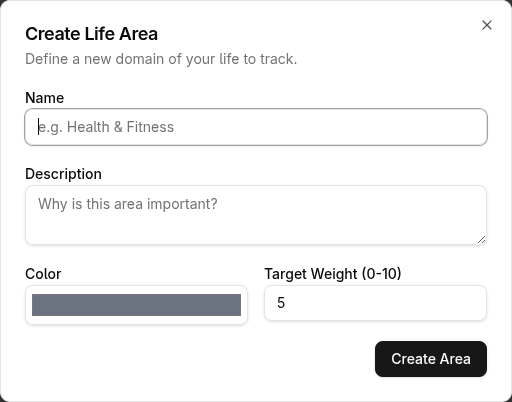
Navigate to Strategy in the main menu. You'll see a space to create your first life area. Common ones include Career, Health, Relationships, and Personal Growth, but make them your own. "Side Hustle" or "Creative Projects" might fit your life better than generic categories.
Don't overthink it
Your life areas aren't set in stone. Start with what feels right and adjust as you learn what works. Most people refine their areas after a few weeks of use.
Setting Your First Objectives
Life areas tell you what matters. Objectives tell you what you're working toward. Without objectives, projects become random busywork. With them, every task connects to a larger purpose.
In each life area, set one objective—a meaningful outcome you want to achieve this quarter. Keep it simple and outcome-focused:
- Career: "Ship the product redesign"
- Health: "Build a consistent morning routine"
- Relationships: "Strengthen connection with close friends"
For each objective, add one or two key results—measurable indicators that you're making progress. If your objective is "Build a consistent morning routine," a key result might be "Exercise 4 times per week" or "Meditate 20 days this month."
Start with just two or three
You don't need objectives in every life area right away. Pick the 2-3 areas where you most want to make progress this quarter. The others can wait.
Creating Your First Project
With objectives set, it's time to create projects that drive them forward. Projects are containers for related tasks—the work that moves your key results.
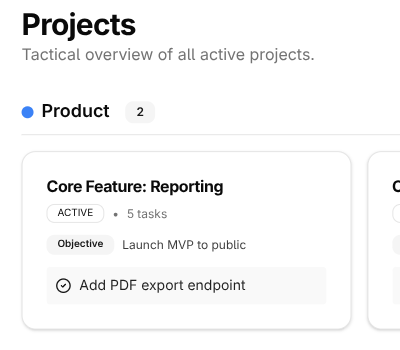
Head to Tactical → Projects and create a new one. Give it a clear name that describes the outcome you want, like "Launch personal website" rather than just "Website." Link it to one of your objectives so progress flows upward automatically.
Now add a few tasks. Don't try to plan everything upfront—just capture the obvious next steps. You'll discover more tasks as you work.
Keep it simple
Resist the urge to create too many projects at once. One or two active projects is plenty. It's better to finish things than to have a dozen half-done initiatives.
Planning Your Week
Weekly planning is where LifeGrid really shines. Set aside 15-20 minutes at the start of each week to decide what you'll focus on.
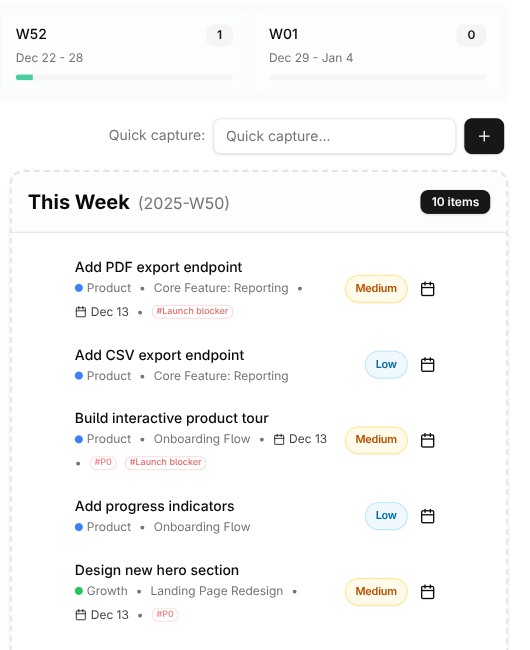
Go to Tactical → Plan to see your week laid out. On the left, you'll see tasks from your projects. Drag them onto specific days, or drop them in the "This Week" pool if you're flexible on timing.
The key is being realistic. Most people dramatically overestimate what they can accomplish in a week. If you're new to this, cut your initial plan in half. Seriously. You can always add more if you finish early, but starting with too much leads to frustration and guilt.
The planning trap
Don't spend your planning session reorganizing tasks and tweaking projects. That's procrastination in disguise. Pick your tasks, set your intentions, and get out. The real work happens when you execute.
→ Learn more about Weekly Planning
Your Daily Routine
Each morning, open Daily Focus. This view shows only what's planned for today—a clean slate that helps you concentrate.
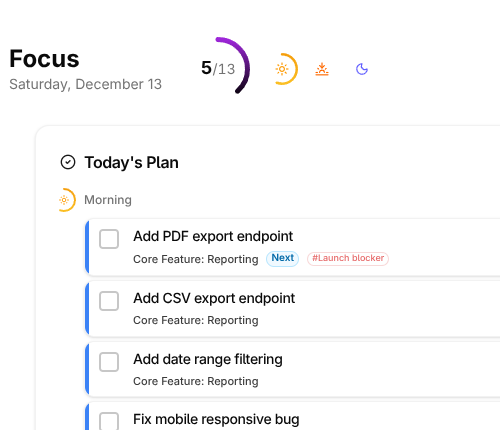
Take a minute to review. Does this still make sense given how you feel and what's come up? Adjust if needed. Maybe yesterday's energy-intensive task should move to tomorrow when you're fresher.
Then simply work through your tasks. Check them off as you go. There's something deeply satisfying about watching your day's list shrink to nothing.
→ Learn more about Daily Planning
You're all set! Start with your life areas, set a few objectives, create one project, plan your first week, and you're on your way.
Your First Week: The Minimum Viable System
You don't need to master everything at once. Here's a practical first-week guide that takes about 90 minutes to set up:
Day 1: Setup (about 85 minutes)
| Step | Time | What to Do |
|---|---|---|
| 1. Life Areas | 15 min | Create 3-5 areas that matter to you |
| 2. Objectives | 10 min | Set 1 objective per active life area |
| 3. Projects | 15 min | Create projects that drive your objectives |
| 4. Brain Dump | 15 min | Get everything out of your head into the inbox |
| 5. Weekly Review | 30 min | Process inbox, review projects, plan your week |
Days 2-6: The Daily Rhythm
Each day follows a simple pattern:
Morning (5 min): Open Daily Focus. Review what's planned. Identify your Most Important Task—the one thing that would make today successful.
During the day: Work through your tasks. Do your MIT first, before email and meetings eat your focus. Check things off as you complete them.
End of day (2 min): Mark what's done. Move unfinished tasks to tomorrow. Glance at what's coming.
Day 7: Weekly Review
Spend 30 minutes resetting for the next week. Process your inbox. Review your projects. Plan what's next. This single practice keeps everything else working.
→ Learn more about Weekly Reviews
Start simple, add complexity later
Detailed habit tracking, time estimates, and quarterly planning reviews can wait. Get comfortable with the basic rhythm—life areas, objectives, projects, weekly reviews—before adding more. Most people try to do everything at once and quit. Don't be most people.
Keyboard Shortcuts
Once you're comfortable, speed up your workflow with keyboard shortcuts:
| Shortcut | Action |
|---|---|
| ⌘K | Open command palette |
| ? | Show all shortcuts |
| n | New task |
| d | Mark task done |
What's Next?
Now that you understand the basics, explore these guides to deepen your practice:
Why LifeGrid Works explains the core insight behind the system—and why traditional productivity advice often fails.
Daily Planning dives into morning routines, energy management, and making the most of your focused time.
Habits shows you how to build recurring practices that compound over time—the secret sauce of personal growth.
OKRs goes deeper into crafting effective objectives, setting measurable key results, and reviewing quarterly progress.
Troubleshooting helps you recover when things go wrong—skipped reviews, piled-up tasks, or stalled projects.