Tasks
Tasks are the atomic units of getting things done. Every project completed, every goal achieved, every habit maintained—it all comes down to individual tasks that you check off one by one.
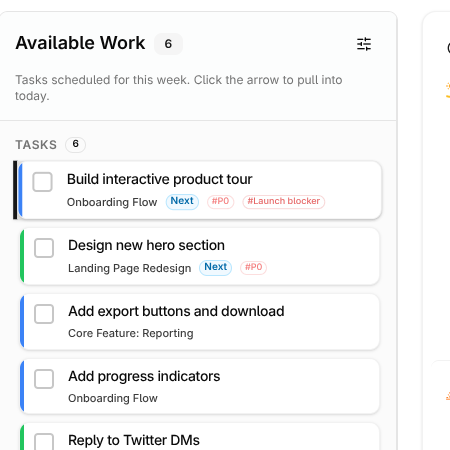
In LifeGrid, tasks aren't just items on a list. They flow through your system: captured in the inbox, organized into projects, planned for specific weeks or days, and finally completed. Understanding this flow is key to staying on top of your work without feeling overwhelmed.
Capturing Tasks Quickly
The fastest way to get a task out of your head and into LifeGrid is quick capture. Press n anywhere in the app, type what you need to do, and hit Enter. That's it—the task goes straight to your inbox.
Capture everything
Don't try to organize while you capture. The moment you think "I should..." or "I need to...", just dump it into the inbox. You'll organize later. The goal of capture is speed, not perfection.
You can also create tasks directly within a project if you already know where they belong. Navigate to the project and add tasks there. They'll inherit the project's context automatically.
The Inbox: Your Processing Queue
Every task starts in the inbox unless you deliberately put it somewhere else. Think of the inbox as a holding pen—nothing lives here permanently. During your daily or weekly planning, you'll process these tasks and decide what to do with each one.
For each task in your inbox, you have a few options:
Do it now if it takes less than two minutes. There's no point in tracking something that quick—just knock it out.
Plan it by assigning it to this week or a specific day. This moves it from "someday" to "I'm committing to this."
Assign it to a project if it's part of something larger. The task joins that project's list and inherits its context.
Defer it if it's not actionable yet. Set a future date and the task will reappear when it's time. See Deferred Tasks for more on this.
Delegate it if someone else should do it. The task moves to your "Waiting on Others" list so you can follow up. See Delegation.
Delete it if, upon reflection, it's not actually worth doing. This is underrated—not every captured thought deserves your time.
Inbox zero is the goal
An empty inbox means everything has been processed and has a place. It doesn't mean you've done everything—it means you've decided what to do with everything. Aim to clear your inbox daily or at minimum during your weekly review.
Task States
As tasks move through your system, they change states:
Inbox is where new tasks land before you've decided what to do with them.
Planned means you've committed to doing this task—either this week generally or on a specific day. These are your active commitments.
Deferred tasks are on pause until a future date. They're hidden from your active view but will resurface automatically.
Done is the satisfying final state. Completed tasks are logged so you can see your progress over time.
The Four Characteristics of a Good Task
Every good task has these four characteristics:
1. It starts with a verb.
Write. Call. Email. Review. Schedule. Fix. Buy. Send. If it doesn't start with an action, it's not a task—it's a noun sitting on a list. "Website" is not a task. "Review website mockups" is a task.
2. It's specific enough that you know when it's done.
You should know immediately when the task is complete. "Work on presentation" is vague—when are you done working on it? "Write first draft of presentation intro" is specific—you're done when the draft exists.
3. It takes less than a few hours.
If a task will take more than a couple hours, it's probably a project in disguise. "Create marketing plan" is too big. Break it down: research competitors, define audience, outline key messages, draft timeline.
4. It connects to something above it.
Every task should belong to a project or directly support a life area. If a task doesn't connect to anything, ask yourself why you're doing it. Not everything needs to be strategic—but if you have dozens of disconnected tasks, you've got a problem.
Writing Good Tasks
The way you write a task matters more than you might think. A vague task creates resistance; a clear task invites action.
Be Specific About the Action
Start with a verb. What exactly will you do?
| Vague (creates resistance) | Specific (invites action) |
|---|---|
| Report | Draft Q4 sales report |
| Mom | Call Mom about birthday plans |
| Website | Review and approve homepage copy |
| Taxes | Gather W-2 forms for accountant |
Make Completion Obvious
You should know immediately when the task is done. If you finish and think "wait, is this complete?"—the task was poorly written.
Good tasks have a clear end state:
- "Send proposal to client" → Done when the email is sent
- "Review 3 candidates" → Done when you've reviewed all three
- "Book flights for trip" → Done when flights are booked
Right-Size Your Tasks
If a task will take more than a couple hours, it's probably a project in disguise. Break it down.
"Plan vacation" isn't a task—it's a collection of tasks: research destinations, choose dates, book flights, reserve hotels, plan activities. Each of those is a single session of work.
On the flip side, don't create tasks for tiny sub-steps. "Open browser" and "Navigate to email" are ridiculous as separate tasks. Find the middle ground.
The planning trap
Don't spend 20 minutes wordsmithing your task list. Good enough is good enough. You can always clarify a task when you sit down to do it. The enemy is overthinking, not underthinking.
Working with Tasks Day to Day
In Daily Focus
Your Daily Focus view shows only what's planned for today—no more, no less. This focused view is intentional. You've already decided what matters today during your planning. Now you just execute.
Check tasks off as you complete them. There's something deeply satisfying about watching your list shrink. If you finish early, you can pull in more from your week's plan. If something takes longer than expected, move it to tomorrow.
Using Tags
Tags help you filter and batch similar work. Common patterns:
- @call for phone tasks—batch these during a dedicated call block
- @email for email-based work—same idea, batch together
- @errands for things outside the house—knock them all out in one trip
- @deep for focused work—protect time for these
- @quick for tasks under 15 minutes—great for low-energy moments
You don't need dozens of tags. A handful of well-chosen ones is plenty.
Keyboard Shortcuts
Once you're comfortable, speed up your workflow:
| Shortcut | Action |
|---|---|
n | Create new task |
d | Mark task done |
e | Edit task |
⌘K | Open command palette |
When Tasks Pile Up
Everyone falls behind sometimes. If your task list has grown unwieldy, don't panic. Here's how to recover:
First, accept that you won't do everything. This is always true, but it becomes obvious when you're behind. Some tasks will be deleted or indefinitely deferred—and that's okay.
Next, do a fresh review. Go through each task and ask: "If I could only do three things this week, would this be one of them?" Be ruthless. Move non-essential tasks out of this week's plan.
Finally, focus on just today. Don't try to plan the whole week when you're overwhelmed. What are the three most important things you can do today? Do those. Tomorrow, repeat.
The weekly review is your reset
If you do nothing else, do your weekly review. It's your chance to catch up, clear out, and start fresh. A messy week followed by a good review beats a perfect system that you don't maintain.