Projects
Projects are where related tasks come together toward a common goal. Instead of a flat list of hundreds of tasks, projects let you group work meaningfully: "Launch personal website," "Plan summer vacation," "Hire new team member." Each project is a container that gives your tasks context and purpose.
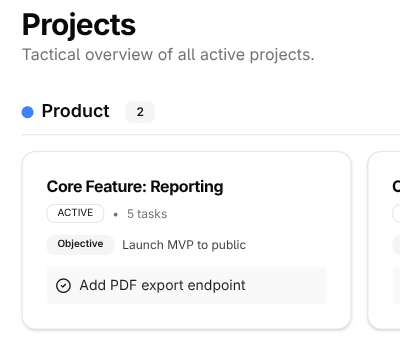
The key insight is that projects have an end. Unlike life areas (which are ongoing) or habits (which repeat), projects are finished when you achieve their outcome. That clarity—knowing what "done" looks like—makes projects powerful organizing tools.
What Makes a Good Project?
A well-defined project has a few characteristics:
A clear outcome. You should be able to picture what success looks like. "Launch personal website" has a clear end state—the site is live. "Work on website" is fuzzy and never really ends.
Multiple tasks. If you can do it in one sitting, it's probably just a task. Projects contain several related tasks that together achieve the outcome.
A reasonable timeframe. Most projects span days to months, not years. If your "project" is a multi-year endeavor, it's probably a life area or a collection of smaller projects.
Name for completion
Write project names as if they're already done. "Launch personal website" is better than "Website" because it tells you exactly what you're aiming for. When you mark it complete, it'll read like an accomplishment.
Creating Projects
Navigate to Tactical → Projects to see your project list and create new ones. When you create a project, give it a descriptive name and assign it to a life area. This connection matters—it's how your daily work ladders up to what you care about most.
You don't need to plan every task upfront. Start with the obvious next steps and add more as you work. Trying to map out an entire project before starting often leads to analysis paralysis.
Example: You're planning a vacation. You might start with just a few tasks:
- Research destinations
- Check calendar for dates
- Set budget
As you work, more tasks will emerge: book flights, reserve hotel, plan activities, arrange pet sitting. Add them when they become clear, not before.
Keep projects focused
Resist the urge to create too many projects at once. One or two active projects per life area is plenty. It's better to finish things than to have a dozen half-done initiatives scattered across your system.
Active vs. On Hold
Projects have states that reflect where they are in their lifecycle:
Active projects are your current focus. These are the projects you're actually working on this week or month. Their tasks show up in your planning views and daily focus.
On Hold projects are paused. Maybe you're waiting for something external, or you've decided to focus elsewhere for now. On-hold projects stay in your system but fade into the background. Their tasks won't clutter your active views.
Completed projects are done. The outcome has been achieved. LifeGrid keeps them for your records so you can look back at what you've accomplished.
Most people have too many "active" projects. Be honest with yourself: if you haven't touched a project in two weeks, it's probably on hold, whether you've admitted it or not. Making this explicit helps you focus.
Working Within Projects
Adding Tasks
From inside a project, you can add tasks that automatically belong to that project. This is faster than creating tasks elsewhere and then assigning them.
Tasks inherit their project's context. When you see a task in your daily focus, you'll know which project it belongs to without having to remember.
Tracking Progress
Each project shows how many tasks are done versus remaining. This gives you a sense of momentum. Watching completion climb from 10% to 50% to 90% is motivating.
But don't obsess over the numbers. Some projects have tasks that emerge as you work. The count isn't a perfect measure—progress on the actual outcome is what matters.
The Next Action
At any moment, each project should have a clear "next action"—the very next physical thing you could do to move it forward. If you look at a project and can't immediately identify the next step, you're likely to procrastinate.
During your weekly review, scan each active project and ask: "What's the next action here?" If there isn't one, either the project is stalled (and needs unblocking) or it's actually complete.
Breaking Down Large Projects
Some projects are big. Really big. "Renovate kitchen" or "Write a book" can feel overwhelming because there's so much to do.
The trick is to focus only on the next few steps. You don't need to plan the entire book—just the next chapter, or even the next section. You don't need every renovation task mapped out—just what's happening this week.
If a project has more than 15-20 tasks visible, consider either:
- Archiving completed tasks so only active work shows
- Breaking into phases like "Kitchen renovation - Phase 1: Demo"
- Focusing on the horizon - only add tasks for the next couple weeks
Planning is not doing
It's easy to spend hours organizing a project instead of actually working on it. Don't mistake productivity theater for real progress. Add enough tasks to know your next steps, then start doing.
Connecting Projects to Strategy
Every project belongs to a life area. This isn't just organizational—it's how you ensure your daily work connects to your bigger picture.
When you look at a life area, you can see which projects are active within it. If a life area has no projects, it might be getting neglected. If it has too many, you might be spreading yourself thin.
Projects can also support OKRs. If you have a key result like "Launch 3 blog posts," there might be a "Launch company blog" project driving that work. This connection helps you see how tactical work ladders up to strategic goals.
When Projects Stall
Projects stall for a few common reasons:
Unclear next action. You look at the project and don't know what to do next. Fix this by defining the very next physical task, no matter how small.
Waiting on something. You need input from someone else, or you're waiting for a delivery, approval, or event. Make the waiting explicit—create a "Waiting for..." task and delegate it so you can follow up.
Lost motivation. Sometimes you started a project that no longer excites you. That's okay. Be honest: is this still worth doing? If yes, reconnect with why it matters. If no, put it on hold or archive it.
Too ambitious. The project felt doable when you started, but now it feels overwhelming. Break it into smaller chunks or redefine the scope. A smaller completed project beats a huge abandoned one.
The Zombie Hunt
A zombie project is one that's been "active" for months but hasn't moved in weeks. You haven't touched it. But you haven't officially killed it either. It just sits there, undead, taking up mental space, creating guilt.
"I really should finish that..." "One of these days I'll get to..." "It's almost done, I just need to..."
Zombies are worse than nothing. At least an empty slot is honest. A zombie pretends you're making progress when you're not. It clutters your list. It weighs on you psychologically.
The 2-3 Week Rule
During your weekly review, look at each active project. If a project hasn't moved in 2-3 weeks, something's wrong. You have two choices:
Restart it. Define the very next action. Put it on this week's tasks. Commit to actually moving it forward. If you can't do that, or don't want to, then...
Kill it or shelve it. Move it to On Hold with a note about when you'll reconsider. Or delete it entirely. No shame in admitting something isn't going to happen. The shame is in pretending it will while it rots on your list.
No limbo. Limbo is where productivity goes to die.
Be ruthless with zombies
Every zombie you keep is a small drain on your mental energy. Over time, a list full of zombies creates a constant background hum of guilt and overwhelm. Kill them. Your future self will thank you.
The weekly review catches stalled projects
During your weekly review, you'll look at each active project. That's when stalled projects become obvious. Don't skip the review—it's your chance to unblock things before they drift for weeks.